
5 GitHub Repos That Turn Claude Into Your Video Editor
Edit video by chatting with Claude Code: 5 open-source repos that cut, caption, reframe and render MP4s, each with its install command and catch.
5 tools · Last checked
No timeline. No export settings. You drop raw footage in a folder, type "cut the filler, add captions, make it 9:16", and an MP4 comes back. These five open-source repos do that with Claude Code.
How we picked: open source, updated in the last 90 days, installable from its own README, and each one covers a different part of the job.
The five repos at a glance #
| Repo | What it does | Price | Install |
|---|---|---|---|
| video-use | Edits raw takes into a finished MP4 | MIT, needs ElevenLabs key | Claude Code skill |
| Kinocut | 200+ guarded FFmpeg tools over MCP | Apache-2.0 | uvx kinocut |
| claude-code-video-toolkit | Makes a video from a brief | MIT, own cloud GPU | clone + /setup |
| AIEV | Self-hosted AI editor with a timeline UI | MIT | clone + start script |
| Remotion skills | Teaches Claude to write Remotion video | Free for individuals | npx skills add |
1. video-use: the raw-footage editor #
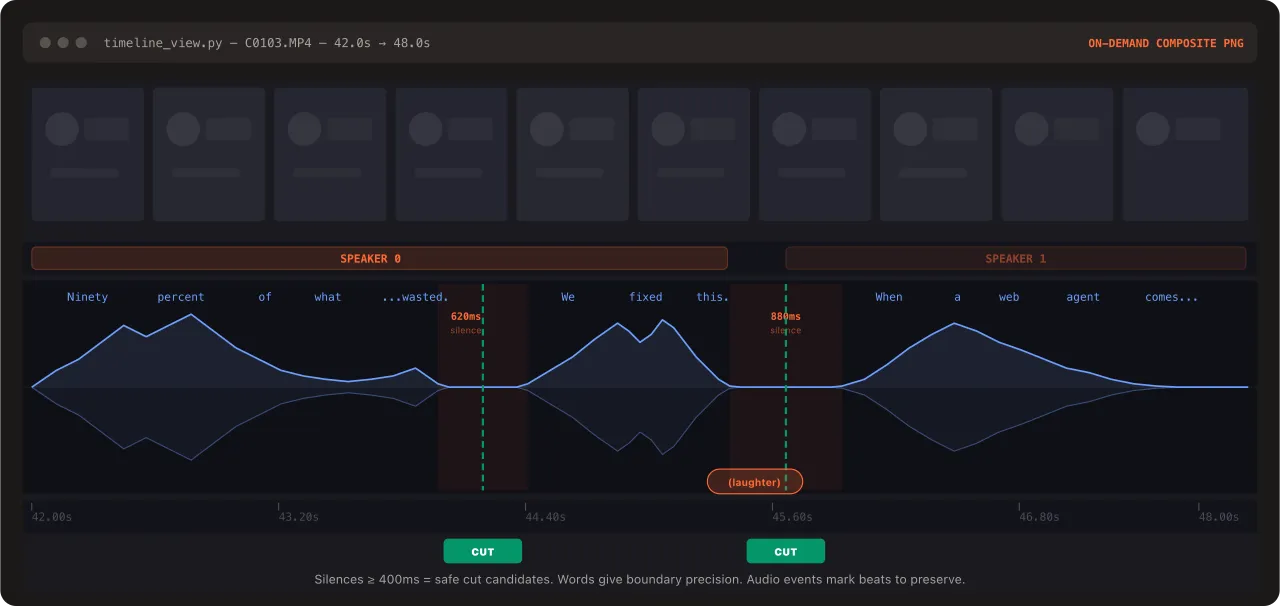
- What: Point Claude Code at a folder of takes and it cuts filler words and dead air, color grades, burns subtitles and renders
final.mp4. - Why: Claude reads a word-level transcript instead of watching frames, so it cuts on word boundaries for a fraction of the tokens. It also checks every cut in the rendered file before you see it.
- Use when: you have talking-head, interview or tutorial footage and want a first cut fast.
- Install:
git clone https://github.com/browser-use/video-use ~/Developer/video-use && ln -sfn ~/Developer/video-use ~/.claude/skills/video-use - Catch: transcription uses ElevenLabs Scribe, so you need an ElevenLabs API key, and that service is paid past its free quota.
2. Kinocut: FFmpeg with guardrails #
- What: An MCP server that gives Claude typed tools to trim, caption, reframe and repurpose clips into Shorts and Reels, all running locally on FFmpeg.
- Why: Claude never guesses FFmpeg flags. Every operation returns a receipt and passes a quality gate, so broken exports get caught.
- Use when: you want precise, repeatable edits from Claude Code, Cursor or any MCP client, and your footage must stay on your machine.
- Install:
claude mcp add kinocut -- uvx kinocut - Catch: more than 200 tools is a lot of surface area. Expect to steer it with specific requests rather than "make it good". Speech-to-text is an extra install of about 1 GB.
3. claude-code-video-toolkit: the production house #
digitalsamba/claude-code-video-toolkit
- What: You describe the video, and Claude writes the script, generates the voiceover, music and visuals, then renders the MP4 with Remotion.
- Why: It makes videos you never filmed: release notes, product demos, explainers. The AI models are open source and run on your own cloud GPU.
- Use when: you need a produced video from a brief, not edits to existing footage.
- Install:
Then rungit clone https://github.com/digitalsamba/claude-code-video-toolkit.git && cd claude-code-video-toolkit && claude/setupand/video. - Catch: voice, image and music generation need a cloud GPU account such as Modal or RunPod. The author says Modal's free monthly compute covers it, but setup takes a few minutes.
4. AIEV: the self-hosted editing studio #
- What: A web dashboard where Claude directs the edit, building motion-graphics scenes and assembling them with Remotion. You then fix the result on a real timeline.
- Why: It produces a draft first and the final later, with karaoke subtitles, auto-cut to shorts, video translation and dubbing. It also handles Vietnamese subtitles and voices, which most tools don't.
- Use when: you want a GUI to review and correct the AI's edit, or you publish in Vietnamese.
- Install:
git clone https://github.com/notivn/AIEVv2.git && cd AIEVv2 && ./start/start.sh - Catch: this is the heaviest setup here: Node, FFmpeg, Chrome, a Gemini API key for images and TTS, and optionally Python for subtitles. The start script installs what it can.
5. Remotion skills: the engine under the others #
- What: The official skills that teach Claude to build videos as React components with Remotion, from creating a composition to rendering it.
- Why: Three of the four repos above render with Remotion. Learn it once and you can build your own templates instead of using someone else's.
- Use when: you want branded, reusable video templates such as intros, data videos or captions.
- Install:
npx skills add remotion-dev/skills - Catch: Remotion is free for individuals and small teams. Larger companies need a paid company license.
Which one to try first #
- Have raw footage? Start with video-use.
- Want control, local-only processing and no API keys? Kinocut.
- Have no footage, only an idea? claude-code-video-toolkit.
- Want to see and fix the AI's edit on a timeline? AIEV.
- Want your own templates? Remotion skills.
FAQ
- Can Claude Code edit videos?
- Yes, through skills and MCP servers. Claude reads a transcript of the footage and drives FFmpeg or Remotion to cut, caption, reframe and render the MP4; it does not watch the frames.
- Are these video editing repos free?
- All five are open source (MIT or Apache-2.0; Remotion has its own license, free for individuals and small teams). Some call paid services: video-use needs an ElevenLabs key, the toolkit runs AI models on your own cloud GPU, AIEV uses a Gemini key.
- Which one keeps my footage on my machine?
- Kinocut runs every edit locally on FFmpeg. video-use sends audio to ElevenLabs for transcription; AIEV can transcribe locally with faster-whisper.