
7 tools that let Claude control a browser
Seven verified tools that let Claude control a browser — MCP servers, Chrome extensions and agent libraries for real web work.
7 tools · Last checked
Pasting a URL into chat is not using the web. These seven open-source tools let Claude and other agents click, type and fill forms in a real browser.
Each pick pushed a commit in the last 90 days (checked 2026-11-16). Ordered from MCP configs to libraries you code against.
The 7 tools at a glance #
| Tool | What it does | Price | Install |
|---|---|---|---|
| Playwright MCP | Structured page snapshots for Claude | Free · OSS (Apache-2.0) | npx @playwright/mcp@latest |
| Chrome DevTools MCP | Drive and debug a live Chrome | Free · OSS (Apache-2.0) | npm i chrome-devtools-mcp@latest -g |
| Browser MCP | Control your own signed-in Chrome | Free · OSS (Apache-2.0) | npx @browsermcp/mcp@latest + extension |
| browser-use | The Python library for web agents | Free · OSS (MIT) | pip install 'browser-use==1.0.5' |
| Stagehand | SDK mixing Playwright code and AI | Free · OSS (MIT) | npm install -g browse |
| nanobrowser | Agent that lives in your side panel | Free · OSS (Apache-2.0) | Chrome Web Store / pnpm build |
| Skyvern | No-code workflows with vision | Free · OSS (AGPL-3.0) | clone + docker compose up -d |
1. Playwright MCP: pages as structured snapshots #
Playwright MCP is Microsoft's MCP server (Model Context Protocol, how Claude plugs into tools) for browser automation. The model reads pages as structured accessibility snapshots, so no screenshots or vision model are needed.
What: Claude navigates, clicks and fills forms from chat.
Why: Reading structure instead of guessing pixels means fewer wrong clicks and reruns.
Use when: You want Claude to drive a browser with the least setup.
Install:
{
  "mcpServers": {
    "playwright": {
      "command": "npx",
      "args": ["@playwright/mcp@latest"]
    }
  }
}
Catch: Accessibility trees eat context. Microsoft's README points coding agents to its more token-efficient Playwright CLI with skills instead.
2. Chrome DevTools MCP: inspect while it drives #
Chrome DevTools MCP lets a coding agent such as Claude, Cursor or Copilot control and inspect a live Chrome for automation, debugging and performance analysis.
What: DevTools exposed as tools: network captures, performance traces, script evaluation, emulation.
Why: When a page misbehaves, Claude sees the console and performance profile, not just the DOM.
Use when: You are building or fixing web apps and want Claude hands-on in Chrome.
Install:
npm i chrome-devtools-mcp@latest -gCatch: Officially supports only Google Chrome and Chrome for Testing; other Chromium-based browsers may work, but that is not guaranteed.
3. Browser MCP: your own Chrome, with your logins #
Browser MCP lets AI apps use your own Chrome: your signed-in sites, your profile, in tabs of their own — everything runs on your computer.
What: A Chrome extension plus a small local daemon that relays Claude's tool calls through Playwright.
Why: No signing in again: the agent works inside sessions you already have.
Use when: Tasks live behind your logins and you want them to stay on your machine.
Install: add the Browser MCP extension from the Chrome Web Store, then run the server from your AI app's MCP config:
npx @browsermcp/mcp@latestCatch: Chrome only, and the agent acts with your real logins. You approve each computer once by matching a six-digit code, and the Stop button halts it.
4. browser-use: the library the field copied #
browser-use is a Python library, with 120,000+ GitHub stars (2026-11-16), that turns a task in plain English into an agent that reads pages, clicks and types.
What: Agent('task', llm=..., browser=...) runs the loop. Anthropic and Google models are built in, and a CLI covers quick tasks.
Why: The biggest community on this list, so someone has likely hit your edge case already.
Use when: You are writing Python and want an autonomous agent, not a tool bridge.
Install:
pip install 'browser-use==1.0.5'Catch: It defaults to the paid Browser Use Cloud; pass Browser('chromium') and your own model to run locally. Pin the exact version: releases break APIs.
5. Stagehand: deterministic first, AI where needed #
Stagehand is an SDK for browser agents. The Playwright code you write runs as written, and AI steps handle the parts that resist selectors.
What: An SDK for TypeScript, Python and Go, plus a browse CLI and skill for coding agents.
Why: act() steps adapt when a site redesigns, while the rest stays scripted.
Use when: Your automation is 90% known and 10% messy.
Install:
npm install -g browse
npx skills add browserbase/stagehand --skill browse
Catch: The SDK's AI steps need your own model API key; only the local browse CLI runs without one.
6. nanobrowser: the agent in your side panel #
nanobrowser is an open-source agent that lives in Chrome's side panel: tell it a task and it reads pages, clicks, types and moves between tabs.
What: A Chrome extension that asks before it submits, sends, deletes or uploads.
Why: No subscription: you bring your own API key or a local model such as Ollama or LM Studio.
Use when: You want a full web agent in the browser, without wiring up an MCP server.
Install: from the Chrome Web Store, or build it:
git clone https://github.com/nanobrowser/nanobrowser.git && cd nanobrowser && pnpm install && pnpm buildCatch: It runs inside the browser, so Claude Code or Claude Desktop cannot call it as a tool. Building from source needs Node 24 and pnpm 10.
7. Skyvern: workflows that see the page #
Skyvern automates browser workflows with LLMs and computer vision. It offers a Playwright-compatible SDK and a no-code workflow builder.
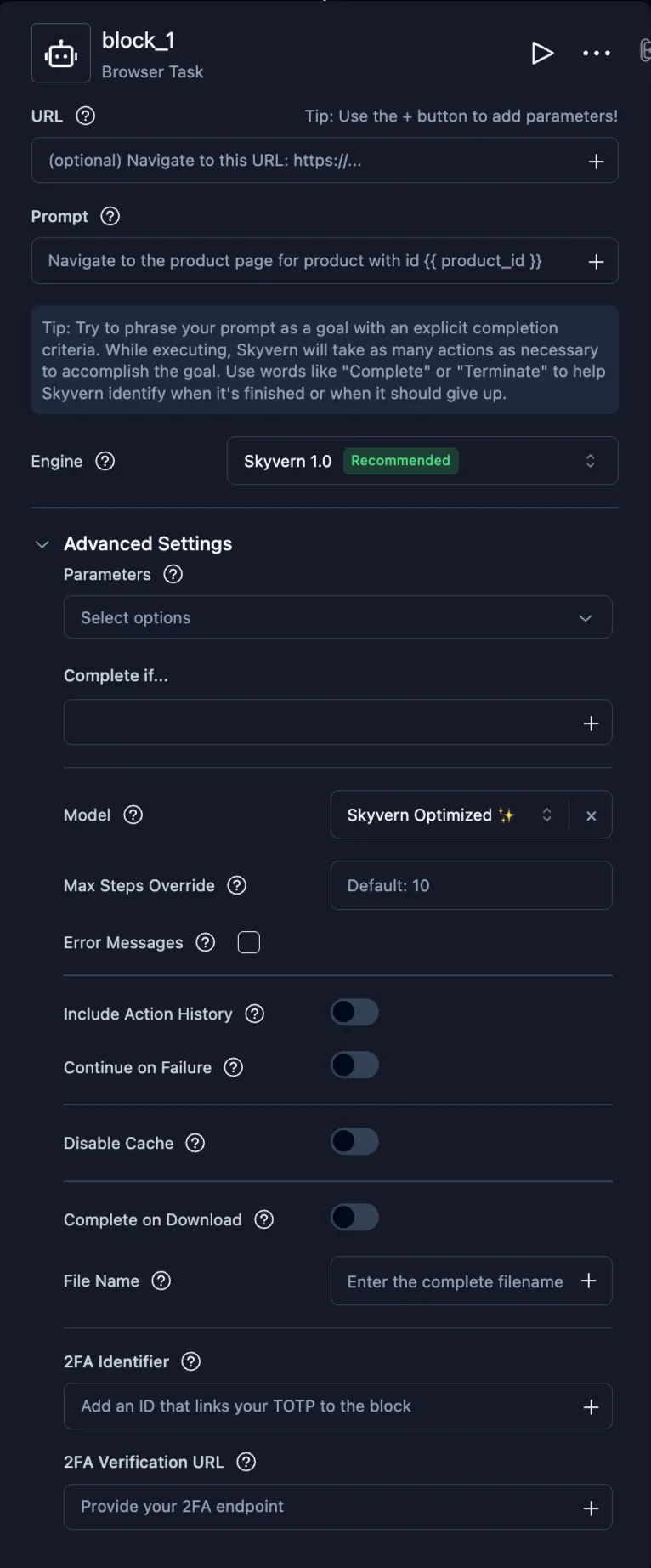
What: Visual element mapping into actions, with a workflow UI for parameters, completion criteria and 2FA.
Why: It reads the page instead of replaying selectors, so one workflow can cover many sites.
Use when: Repetitive form-and-portal work where brittle scripts keep breaking.
Install:
git clone https://github.com/Skyvern-AI/skyvern.git && cd skyvern && docker compose up -dCatch: AGPL-3.0: if you offer a modified version as a network service, you must publish your changes.
Which one to try first #
Config-only start → #1 or #2. Tasks behind your logins → #3. A ready agent in Chrome → #6. Writing Python agents → #4. Mostly-scripted flows → #5. No-code workflows at scale → #7.
FAQ
- What is Playwright MCP?
- Microsoft's MCP server for browser automation. Claude reads structured accessibility snapshots instead of screenshots, so it navigates, clicks and fills forms against the page's actual structure.
- Can Claude use my logged-in browser sessions?
- Yes with Browser MCP: a Chrome extension and a local daemon let AI apps drive your own Chrome — your signed-in sites and profile, all on your computer. You approve the connection once by matching a six-digit code.
- Is browser-use free?
- The library is MIT-licensed and free with a local browser and your own model key. Its default setup uses Browser Use Cloud, which is paid.