
7 CRM systems you can run on your own server
Seven self-hosted CRM systems, from Twenty and Odoo to SuiteCRM and EspoCRM: what each one does, how to install it and the catch.
7 tools · Last checked
A hosted CRM (customer relationship manager) keeps your leads, deals and notes in someone else's cloud. These seven store them in a database on your own server.
Every pick pushed a commit in the last 90 days (checked 2026-11-14), with an install path from its own repo or docs. Ordered by GitHub stars.
The 7 CRMs at a glance #
| CRM | What it does | Price | Install |
|---|---|---|---|
| Twenty | The open Salesforce alternative | Free · OSS (AGPL-3.0 core) | install script (Docker Compose) |
| Odoo | CRM inside a full business suite | Free · OSS (LGPL-3.0 Community) | docker pull odoo |
| Monica | Personal CRM for friends and family | Free · OSS (AGPL-3.0) | docker pull monica |
| Krayin | CRM built on Laravel | Free · OSS (MIT) | composer create-project krayin/laravel-crm |
| SuiteCRM | The SugarCRM fork | Free · OSS (AGPL-3.0) | download + web installer |
| Frappe CRM | Sales CRM on the Frappe Framework | Free · OSS (AGPL-3.0) | wget + docker compose up -d |
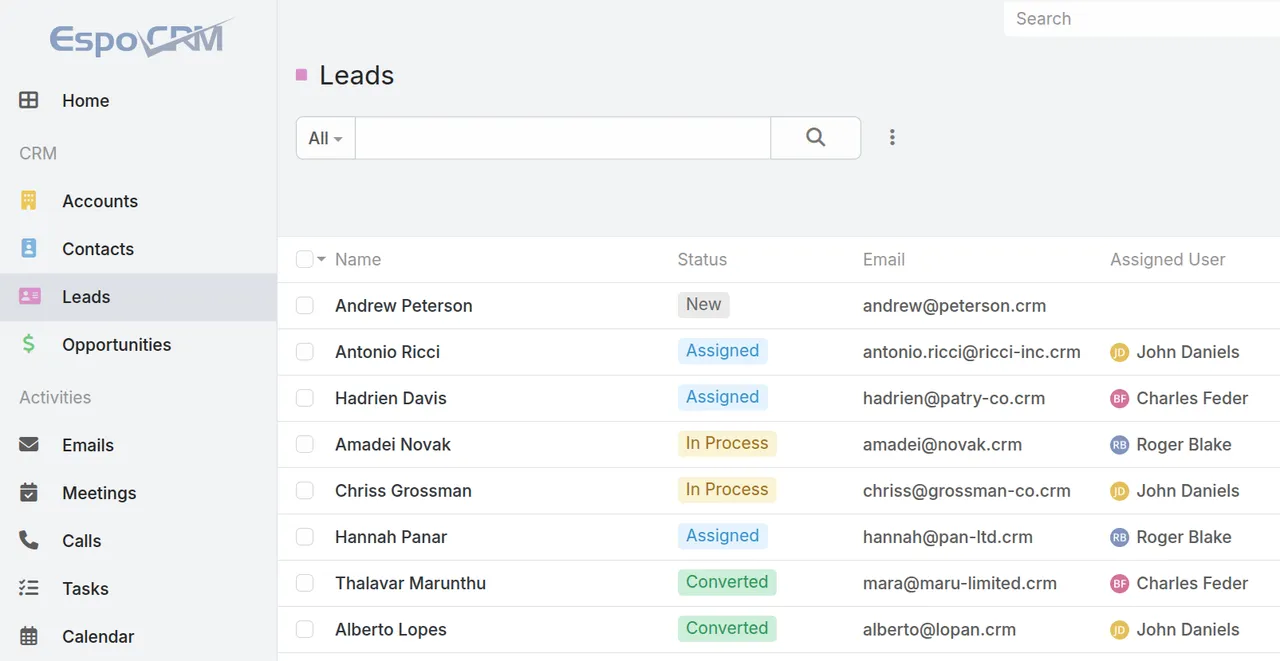
| EspoCRM | Classic CRM with a clean interface | Free · OSS (AGPL-3.0) | docker pull espocrm/espocrm |
1. Twenty: the open alternative built for AI #
Twenty is an open-source CRM that calls itself "The open alternative to Salesforce, designed for AI."
What: A TypeScript CRM where objects, fields and views are defined as code, with workflows and AI agents included.
Why: The twenty CLI scaffolds apps on top of it, and the repo ships skills for coding agents.
Use when: You want a modern CRM your developers can extend like a platform.
Install:
bash <(curl -sL https://raw.githubusercontent.com/twentyhq/twenty/main/packages/twenty-docker/scripts/install.sh)Catch: Mostly AGPL-3.0, but files marked Enterprise need a commercial license. The installer accepts only full release tags, not latest.
2. Odoo: CRM with an entire business behind it #
Odoo is "a suite of web based open source business apps", an open-source CRM among them.
What: A modular suite where CRM is one app beside accounting, inventory, eCommerce and HR.
Why: One deployment covers sales, stock and books.
Use when: You want CRM plus ERP (business management) in one system, and accept the suite's weight.
Install:
docker pull odooThe image needs a running PostgreSQL server.
Catch: Two editions: Community (open source, LGPL-3.0) and Enterprise (licensed). Check which one a feature is in.
3. Monica: the personal CRM #
Monica is a "Personal CRM. Remember everything about your friends, family and business relationships."
What: Contacts, relationships, birthday reminders, notes and a diary about the people in your life.
Why: The only pick for a person, not a sales team. Its README headline is "Document your life".
Use when: You want to remember birthdays and conversations, not forecast a quarter.
Install:
docker pull monicaThe image needs a MySQL or MariaDB database.
Catch: The repo's main branch is a beta. The stable version is the 4.x branch, which the Docker image ships.
4. Krayin: the CRM for Laravel shops #
Krayin is a "Free & Open Source CRM Built with Laravel for Customer, Lead, and Sales Management."
What: A CRM built on Laravel (a PHP framework) and Vue.js, with a modular design, custom attributes and an admin dashboard.
Why: If your team ships Laravel, this is a CRM your developers can read end to end.
Use when: You want MIT-licensed code and a stack your PHP team can customize.
Install:
composer create-project krayin/laravel-crm
php artisan krayin-crm:install
Set APP_URL, the database and mail in .env between the two commands.
Catch: You run the PHP stack yourself: PHP 8.3 or higher, 3 GB of RAM, MySQL or MariaDB.
5. SuiteCRM: the SugarCRM fork #
SuiteCRM is "Open source CRM for the world", a fork of SugarCRM built on its last open-source release.
What: An enterprise CRM on a LAMP stack (Apache, PHP, MySQL or MariaDB).
Why: It comes with an extensions directory, a partner network and vendor support plans.
Use when: You need an established enterprise CRM and already run LAMP servers.
Install: No one-line command. Download the release, unzip it into your web root and run the web installer, as in the installation guide.
Catch: This repo is SuiteCRM 7; SuiteCRM 8 lives in a separate repo and is, per the README, "not yet as feature complete".
6. Frappe CRM: sales on the Frappe Framework #
Frappe CRM is "a simple, affordable, open-source CRM tool designed for modern sales teams", built on the Frappe Framework.
What: Leads and deals on one page with activities, notes and tasks, a kanban board, custom views, and call and WhatsApp integrations.
Why: Three commands start it with Docker, and the site answers at crm.localhost:8000/crm.
Use when: You want a sales CRM without deploying all of ERPNext, Frappe's business suite.
Install:
wget -O docker-compose.yml https://raw.githubusercontent.com/frappe/crm/develop/docker/docker-compose.yml
wget -O init.sh https://raw.githubusercontent.com/frappe/crm/develop/docker/init.sh
docker compose up -d
Catch: This Docker setup pulls the unstable develop branch; production uses the easy-install.py script. Change the default login (Administrator / admin) first.
7. EspoCRM: the classic CRM with a clean interface #
EspoCRM is "a free, open-source CRM platform designed to help organizations build and maintain strong customer relationships".
What: Leads, contacts, opportunities, campaigns and support cases in a single-page app with a PHP REST API backend.
Why: The README promises "an uncluttered, minimalist, and fast user interface".
Use when: You want standard CRM done plainly, without a suite around it.
Install:
docker pull espocrm/espocrmThe docs' quick start runs it beside a MariaDB container.
Catch: Reports, workflows and business process management come in the Advanced Pack, an official add-on, not in the core.
Which one to try first #
Developer-extensible modern CRM → #1. Whole-business suite → #2. Relationships, not sales → #3. Laravel shop → #4. Established enterprise CRM → #5. Sales team on Docker → #6. Plain classic CRM → #7.
FAQ
- Why run a CRM yourself instead of using Salesforce or HubSpot?
- The customer data sits in a database you back up and migrate yourself, and you can change the code. The tradeoff is that you own uptime, updates and backups.
- What is the difference between Twenty, SuiteCRM and EspoCRM?
- Twenty is built to be extended as code, with its own CLI and SDK. SuiteCRM is the SugarCRM fork on a LAMP stack, and EspoCRM is a single-page app with a PHP REST API.
- Is Odoo a CRM or an ERP?
- Both: CRM is one app in the Odoo suite, beside accounting, inventory, eCommerce and HR. Pick Odoo if you want one system for the whole business, and a dedicated CRM from this list otherwise.
Sources
- github.com/twentyhq/twenty
- github.com/odoo/odoo
- github.com/monicahq/monica
- github.com/krayin/laravel-crm
- github.com/SuiteCRM/suitecrm
- github.com/frappe/crm
- github.com/espocrm/espocrm
- docs.twenty.com/developers/self-host/capabilities/docker-compose
- docs.suitecrm.com/admin/installation-guide/downloading-installing/
- espocrm.com/extensions/advanced-pack/