
7 open-source tools that turn text into voiceover audio
Seven open-source text-to-speech tools that run on your machine — from instant CPU narration to voice cloning you can train.
7 tools · Last checked
Voice actors and per-character cloud APIs price out most hobby videos. These seven open-source text-to-speech tools run on your own machine — instant narration, or a clone of a voice you own.
Every pick has public model weights, a commit in the last 90 days (checked 2026-11-11) and an install from its own docs. One uses a custom license, flagged below. Clone only voices you have permission to use. Ordered from desktop app to toolkit.
The 7 tools at a glance #
| Tool | What it does | Price | Install |
|---|---|---|---|
| Voicebox | Desktop voice studio: clone, generate, dictate | Free · OSS (MIT) | Download page |
| kokoro-onnx | Fast speech on CPU from the Kokoro model | Free · OSS (MIT) | pip install -U kokoro-onnx |
| F5-TTS | Zero-shot cloning from a short clip | Free · OSS (MIT) | pip install f5-tts |
| VoxCPM | Multilingual speech + creative voice design | Free · OSS (Apache-2.0) | pip install voxcpm |
| GPT-SoVITS | Clone a voice you fine-tune from 1 minute | Free · OSS (MIT) | conda + install.sh |
| IndexTTS-2.5 | Controlled narration: emotion, speed, pronunciation | Free · custom license | clone + uv sync |
| Coqui TTS | The toolkit: 1,100+ languages, training included | Free · OSS (MPL-2.0) | uv pip install coqui-tts |
1. Voicebox: the voice studio app #
Voicebox is a desktop app (macOS, Windows) that wraps several TTS engines in one interface: import or create voices, generate speech, dictate into other apps, all running locally.
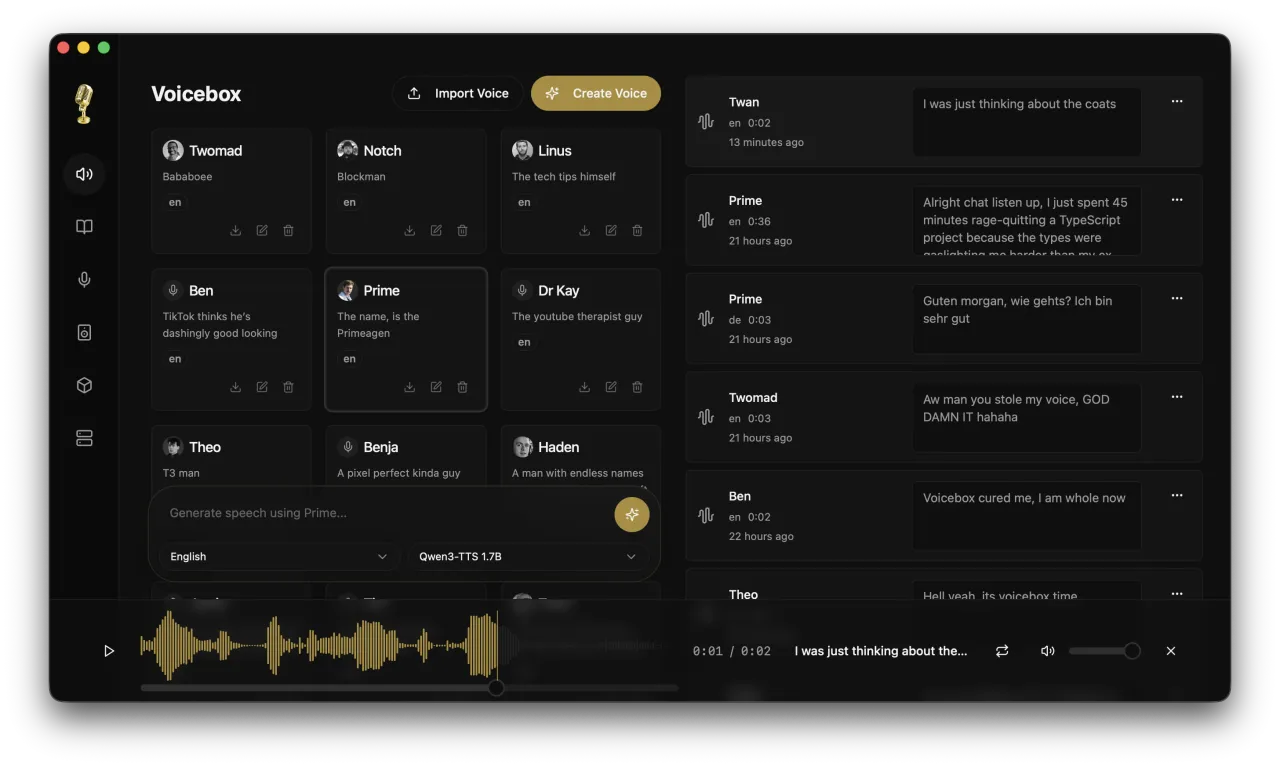
What: Voice cloning across 8 engines, sound tags like [laugh], audio effects, and texts up to 50,000 characters.
Why: Everything the pip tools below do, without writing any code.
Use when: You want an app, not a terminal.
Install: Download the DMG or MSI from voicebox.sh.
Catch: No prebuilt Linux app: downloads cover macOS and Windows, and Linux users build from source.
2. kokoro-onnx: fast speech on any CPU #
kokoro-onnx runs the small Kokoro model through onnxruntime: near real-time on an M1 Mac, about 300 MB (80 MB quantized), several languages and voices.
What: A lightweight Python library that turns text into spoken audio without a GPU.
Why: The fastest route from script to audio on a plain laptop.
Use when: You need narration in one of its built-in voices, not a clone.
Install:
pip install -U kokoro-onnxCatch: Fixed voice set — no cloning — and the ONNX model plus voice files download separately from the release page.
3. F5-TTS: zero-shot cloning in one pip #
F5-TTS clones a voice from a short reference clip with no training step.
What: A Python CLI and web UI that take reference audio plus a script and emit matching speech.
Why: No dataset, no fine-tune — seconds of reference audio are the whole setup.
Use when: You want a specific voice quickly and one-off.
Install:
pip install f5-ttsCatch: You install the right PyTorch wheel for your platform first (CUDA, ROCm, or CPU) — the README lists one per setup.
4. VoxCPM: expressive speech and voice design #
VoxCPM is a 2B-parameter speech model for 30 languages. Describe a voice in words and it generates one, or clone a voice from reference audio, with 48 kHz output.
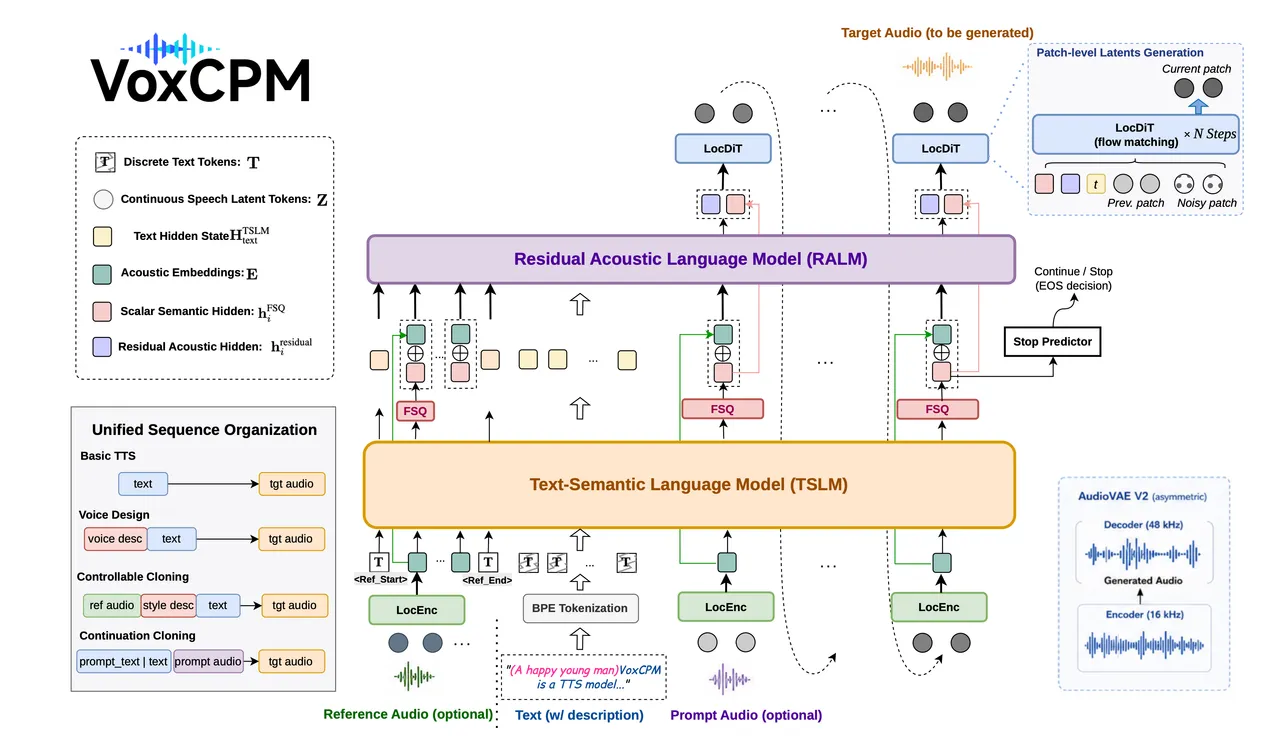
What: A pip-installable model that handles plain TTS, cloning, and inventing voices from a text description.
Why: Voice design is the part the cloners skip — no reference audio needed.
Use when: You need a voice nobody has a recording of.
Install:
pip install voxcpmCatch: The docs require Python 3.10 to 3.12 and CUDA 12 or newer, so plan on an NVIDIA GPU.
5. GPT-SoVITS: train one voice properly #
GPT-SoVITS fine-tunes a model on as little as 1 minute of a voice. Its WebUI also builds the dataset: it removes background music, slices the audio, then transcribes and labels it.
What: A WebUI for cloning voices you can keep improving, from a minute of clean audio.
Why: Zero-shot clones drift on long scripts; a fine-tuned model holds the timbre.
Use when: One voice matters enough to spend an hour on it.
Install:
conda create -n GPTSoVits python=3.10
conda activate GPTSoVits
bash install.sh --device CPU --source HF
Catch: GPU training on Macs gives much lower quality, so the README trains on CPU there. Windows gets a one-click package.
6. IndexTTS-2.5: narration you can direct #
IndexTTS clones a voice from one reference clip, then lets you direct it: emotion, speed from 0.5× to 2.0×, and pronunciation via Pinyin, CMU phonemes or Japanese kana. Version 2.5 speaks Chinese, English, Japanese, Spanish and Arabic.
What: A controllable TTS engine with a vLLM recipe for serving it in production.
Why: Duration and emotion control is what raw cloning models leave to chance.
Use when: The read has to hit specific pacing and tone, take after take.
Install:
git clone https://github.com/index-tts/index-tts && cd index-tts && uv sync --all-extrasCatch: Ships under the bilibili Model Use License, not an OSI license — read the terms before any commercial use.
7. Coqui TTS: the 1,100-language toolkit #
Coqui TTS, a maintained fork of the original, now-unmaintained Coqui repo, is a Python toolkit: pretrained models in 1,100+ languages, XTTSv2 cloning in 17 languages with streaming under 200 ms, voice conversion, and training recipes.
What: A Python toolkit with command-line and API access, plus the code to train or fine-tune your own models.
Why: For many languages or a custom model, you need a toolkit, not an app.
Use when: You are building a product or covering languages the others skip.
Install:
uv pip install coqui-ttsCatch: Expect to write Python; there is no GUI. It is a community fork, and the original Coqui repo gets no updates.
Which one to try first #
Want an app instead of a terminal → #1. Just narration in a fixed voice → #2. Clone a voice in five minutes → #3. Build a voice that holds up on long scripts → #5. Many languages or a custom model → #7. If you would rather use cloud APIs on free credits, that is our free AI voice generator guide.
FAQ
- What is the best open-source text-to-speech?
- It depends on the job: VoxCPM or IndexTTS-2.5 for controllable quality, F5-TTS or GPT-SoVITS for cloning a specific voice, Voicebox if you want a desktop app, kokoro-onnx for fast CPU narration.
- Can open-source TTS clone a voice?
- Yes. F5-TTS clones zero-shot from a short reference clip, GPT-SoVITS fine-tunes from about 1 minute of audio, and VoxCPM clones from reference audio or designs new voices from a description. Only clone voices you have permission to use.
- Does open-source TTS run offline?
- Yes — all seven tools here run locally on your machine once their models have downloaded. kokoro-onnx needs about 300 MB (80 MB quantized), while the bigger models want a GPU.