
6 tools that turn Claude into an SEO auditor
Six open-source MCP servers and Claude skills that crawl your site, read Search Console, run Lighthouse and write the fixes — free.
6 tools · Last checked
An SEO audit is either an agency retainer or a tool subscription — and either way you get a report you still have to act on alone. These six open-source tools put the crawl, the Search Console data and the fix-writing inside Claude, free.
Five are MCP servers (plugins that give Claude new tools); the sixth is a set of Claude Skills. Every pick is open source, pushed a commit in the last 90 days (checked 2026-11-11), installs with one command from its own docs, and runs free; optional paid add-ons are flagged. They are ordered as an audit workflow: scan, data, speed, markup, keywords, playbook.
The 6 tools at a glance #
| Tool | What it does | Price | Install |
|---|---|---|---|
| SEO Audit Console | 143 checks joined with your Search Console clicks | Free · OSS (Apache-2.0) | claude mcp add |
| Search Console MCP | GSC, Bing, GA4, AdSense in one context | Free · OSS (MIT) | npx search-console-mcp setup |
| Lighthouse MCP | Lighthouse scores, mobile or desktop | Free · OSS (MIT) | npx lighthouse-mcp |
| Web Validator | W3C markup, JSON-LD, broken links | Free · OSS (MIT) | npx -y mcp-web-validator |
| free-seo-mcp | Keyword research from free sources | Free · OSS (MIT) | git clone && uv sync |
| Claude SEO Skills | 61 agency playbooks, no API keys | Free (MIT) | git clone + copy loop |
1. SEO Audit Console: the full-audit orchestrator #
SEO Audit Console is an MCP server that joins your Search Console history with a crawl of your site and runs 143 checks, ranked by the clicks each fix could recover. It writes the fix too: the 301 rule, the JSON-LD, the internal links.
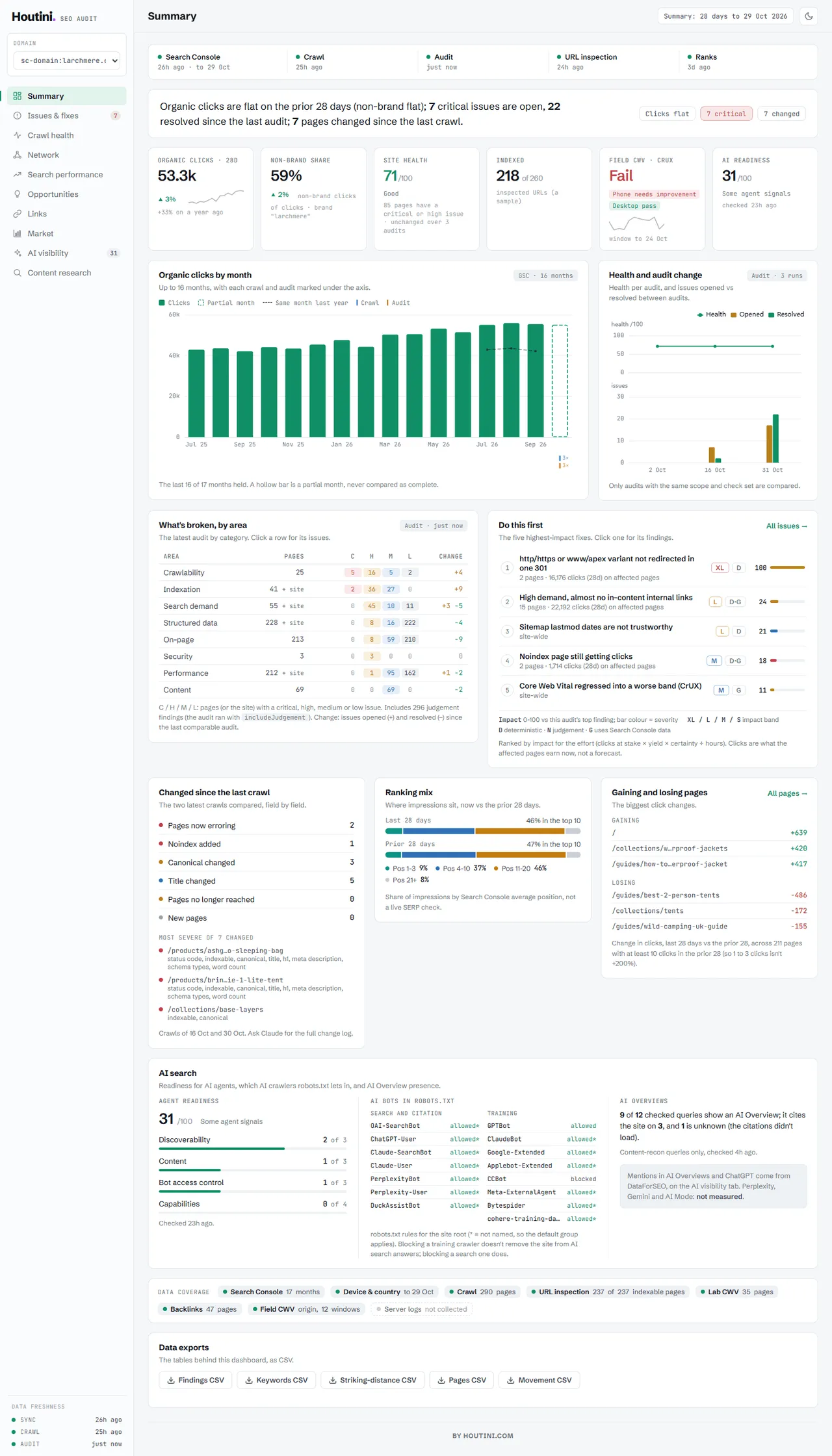
What: A prioritized audit report plus a browser dashboard.
Why: A crawler only sees what your site says; this one also sees what Google did about it, so findings carry the traffic at stake.
Use when: You own the Search Console property and want one audit that ends in a to-do list instead of a pile of crawler warnings.
Install:
claude mcp add seo-audit-console --env GOOGLE_APPLICATION_CREDENTIALS=/path/to/service-account.json -- npx -y @houtini/seo-audit-consoleCatch: Needs a Google service account whose email is added as a user on the property, the step everyone misses. DataForSEO and Majestic tiers are paid.
2. Search Console MCP: your ranking data on tap #
Search Console MCP gives Claude Google Search Console (GSC), Bing Webmaster Tools, GA4 and AdSense: analytics queries, URL inspection, sitemap submit and cannibalization checks.
Why: Answers "which pages lost clicks this month" without opening four consoles and doing VLOOKUPs by hand.
Use when: You want ongoing traffic questions between audits, not a one-off report.
Install:
npx search-console-mcp setupCatch: Setup runs a browser sign-in per Google account. Sitemap submit stays locked until you re-authorize with write access.
3. Lighthouse MCP: page-speed scores in the chat #
Lighthouse MCP wraps Google's Lighthouse so the agent audits any URL: performance, accessibility and SEO categories, with mobile or desktop emulation and network throttling.
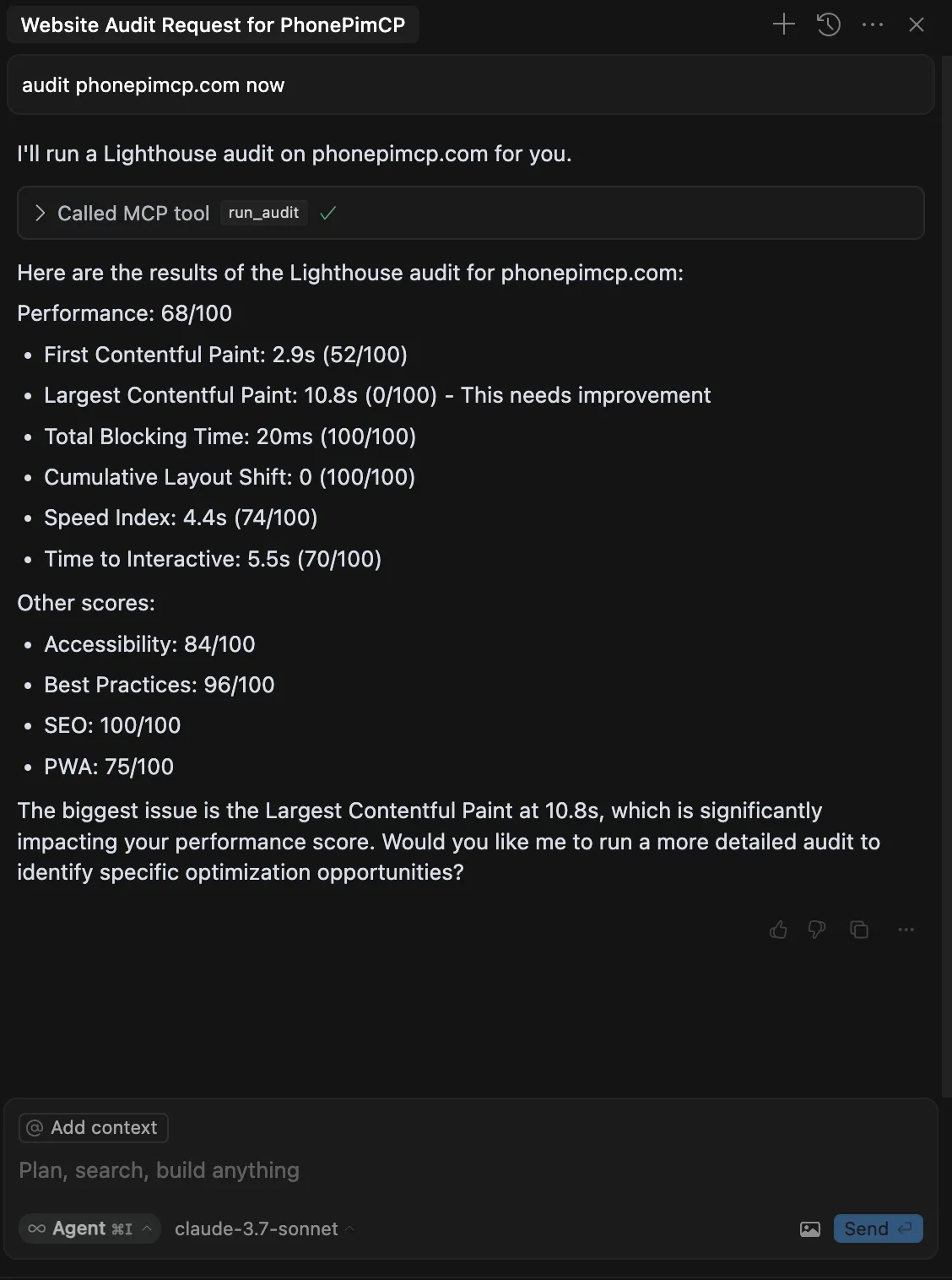
What: Real Lighthouse runs with the failing metrics called out.
Why: The score and your code sit in the same window, so the agent can attempt the LCP fix instead of describing it.
Use when: A Lighthouse score bothers you and you want the fix tried, not a PDF.
Install:
npx lighthouse-mcpCatch: Runs a real Chrome on your machine — Lighthouse's requirement — one audit at a time, timing out after 120 seconds.
4. Web Validator: markup, schema, dead links #
Web Validator is an MCP server that checks HTML and CSS against the W3C validators, SEO metadata, JSON-LD (structured data) syntax and broken links, and takes responsive screenshots.
Why: Catches the boring failures that cost rankings: a typo'd JSON-LD block, internal links gone 404.
Use when: You just touched templates, moved pages, or edited schema and want the W3C-level receipt.
Install:
npx -y mcp-web-validatorCatch: The screenshot tool downloads a headless browser into Puppeteer's cache on first use, and the hosted variant takes no screenshots, reads no local files and audits at most eight sitemap pages per call.
5. free-seo-mcp: keyword research at $0 #
free-seo-mcp builds keyword research from free sources: autocomplete, Google Trends, Bing impressions, Reddit threads and competitor sitemaps. It then estimates monthly volume and tiers each keyword.
What: Keyword research with no Ahrefs, Semrush or DataForSEO subscription.
Why: Google only shows exact volume to advertisers; this one builds its own estimate instead of reselling one.
Use when: You want to turn audit findings into a content plan on a zero budget.
Install:
git clone https://github.com/JohnWayneeee/free-seo-mcp.git && cd free-seo-mcp && uv syncCatch: Volumes are estimates, not Google's exact number: read the tiers, not the decimals. Needs Python 3.11+ and uv.
6. Claude SEO Skills: 61 agency playbooks #
Claude SEO Skills is the SEO agency StudioHawk's set of 61 Claude Skills (instruction files Claude loads on demand): technical audits, content briefs, AI-search visibility checks. No API keys or dependencies.
What: Agency SEO process as skills, MIT-licensed, no email gate.
Why: The data tools above hand you numbers; these write the audit, the brief and the client report the way an agency would.
Use when: You have the data and want the deliverable written.
Install:
git clone https://github.com/lhitches/claude-seo-skills.git && cd claude-seo-skills && for f in skills/*.md; do mkdir -p ~/.claude/skills/"$(basename "$f" .md)" && cp "$f" ~/.claude/skills/"$(basename "$f" .md)"/SKILL.md; done && cp -r skills/topical-authority-map skills/review-proof-sorter ~/.claude/skills/Catch: Skills are process, not data — none of them crawl or call Search Console themselves, so you feed them exports or crawl data.
Which one to try first #
Own the Search Console property and want the whole audit in one go → #1. Just want to ask traffic questions between audits → #2. A slow page is bothering you → #3. Turning findings into a content plan → #5, then #6 to write the brief.
FAQ
- Can Claude do an SEO audit?
- Yes — with MCP servers Claude can crawl your site, pull your Search Console history, run Lighthouse and write the fixes. The six open-source tools in this list do it free; SEO Audit Console is the fastest start if you own the property.
- Do I need Ahrefs or Semrush for this?
- No. Every tool here is open source and free. Keyword volumes come from autocomplete, Google Trends and Bing's free API instead of a paid subscription; backlink data via Majestic or DataForSEO is an optional paid add-on in SEO Audit Console.
- What does Claude need to read my Search Console data?
- Access to a verified property: either a Google Cloud service account whose email is added as a user on the property (SEO Audit Console), or an OAuth sign-in through the setup command (Search Console MCP).