
6 tools that turn your AI into a deep research agent
Six verified open-source deep research agents — a Claude Code skill, self-hosted answer engines and report pipelines with citations.
6 tools · Last checked
One question in, a cited report out: that is deep research, and it no longer needs a subscription. These six open-source tools plan sub-questions, search the web and your documents, then write a report with sources.
Every pick pushed a commit in the last 90 days (checked 2026-11-19) and has an install path from its own docs. Ordered easy to advanced: a one-command answer engine first, then desktop apps and report pipelines you build on.
The 6 tools at a glance #
| Tool | What it does | Price | Install |
|---|---|---|---|
| Vane | Self-hosted answering engine | Free · OSS (MIT) | docker run … itzcrazykns1337/vane:latest |
| hyperresearch | Deep research skill for Claude Code | Free · OSS (MIT) | pip install hyperresearch |
| SurfSense | NotebookLM-style agent for your docs | Free · OSS (Apache-2.0) | curl … install.sh | bash |
| Local Deep Research | Fully local research assistant | Free · OSS (MIT) | docker compose up -d |
| gpt-researcher | Report pipeline as a pip library | Free · OSS (Apache-2.0) | pip install gpt-researcher |
| Morphic | Answer engine starter to fork | Free · OSS (Apache-2.0) | clone + docker compose up -d |
1. Vane: a self-hosted answer engine, one command #
Vane (formerly Perplexica) is a privacy-focused answer engine that runs on your own hardware. It answers from the web with cited sources, and your searches stay private.
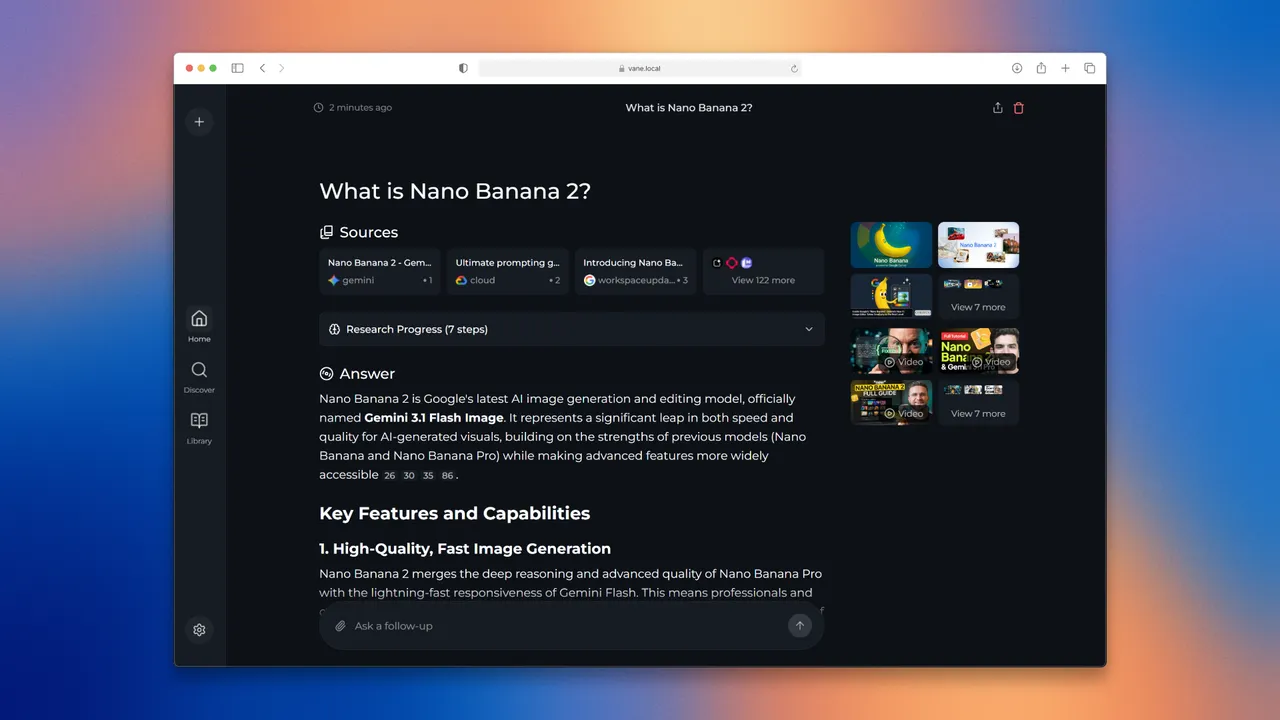
What: A web UI over SearxNG: search modes from quick answers to Quality Mode deep research, plus image and video search and file uploads.
Why: Perplexity-style answers with your keys, on your machine — local Ollama or cloud providers, your choice.
Use when: You want the hosted-search experience without the hosted part.
Install:
docker run -d -p 3000:3000 -v vane-data:/home/vane/data --name vane itzcrazykns1337/vane:latestCatch: Answer quality depends on the model you connect, and web search runs only through SearxNG for now (Tavily and Exa are listed as coming soon).
2. hyperresearch: deep research inside Claude Code #
hyperresearch is a deep research skill for Claude Code and OpenAI Codex. It searches the web, scholarly papers, SEC filings, clinical trials and economic data, then checks its citations.
What: pip install hyperresearch, run hyperresearch install, then type /hyperresearch <question>; every run keeps its sources so the next run builds on them.
Why: Your coding agent becomes the research agent — no new app, no new tab, evidence stored in the project.
Use when: You already live in Claude Code and want reports next to your code.
Install:
pip install hyperresearch && hyperresearch installCatch: The #1 DRACO benchmark score in its README is self-reported and belongs to the hosted version, Hyperresearch Deep, not this skill.
3. SurfSense: NotebookLM for your own documents #
SurfSense is a free desktop app for documents you can't upload to cloud AI. Like NotebookLM, it researches and edits your documents, but on your machine.
What: Your disk holds the index; you pick the model, local or remote; MCP plugins add Notion, DeepWiki or any registry connector.
Why: Combine private files and web sources in one searchable, citeable workspace without an account.
Use when: The sources that matter are private files you cannot send to a cloud AI.
Install:
curl -fsSL https://raw.githubusercontent.com/MODSetter/SurfSense/main/docker/scripts/install.sh | bashCatch: Its built-in web connectors need a SurfSense license after a free 14-day trial; third-party MCP plugins do not.
4. Local Deep Research: zero cloud, zero leaks #
Local Deep Research is a research assistant that runs locally with any LLM and builds a searchable knowledge base in an encrypted database on disk.
What: A local web UI over your Ollama models and a SearxNG instance, with an encrypted (SQLCipher) store for everything it learns.
Why: Research runs entirely on your hardware — nothing to leak, nothing to bill.
Use when: The questions are sensitive or the network is not trusted.
Install:
curl -O https://raw.githubusercontent.com/LearningCircuit/local-deep-research/main/docker-compose.yml && docker compose up -dCatch: It needs Ollama and SearxNG running alongside, a three-container stack. The compose file above works everywhere; the README's --network host route needs Linux or Docker Desktop 4.34+ with host networking turned on.
5. gpt-researcher: the report pipeline as a library #
gpt-researcher writes research reports with citations. Planner and execution agents split a task into questions, then a publisher combines the findings.
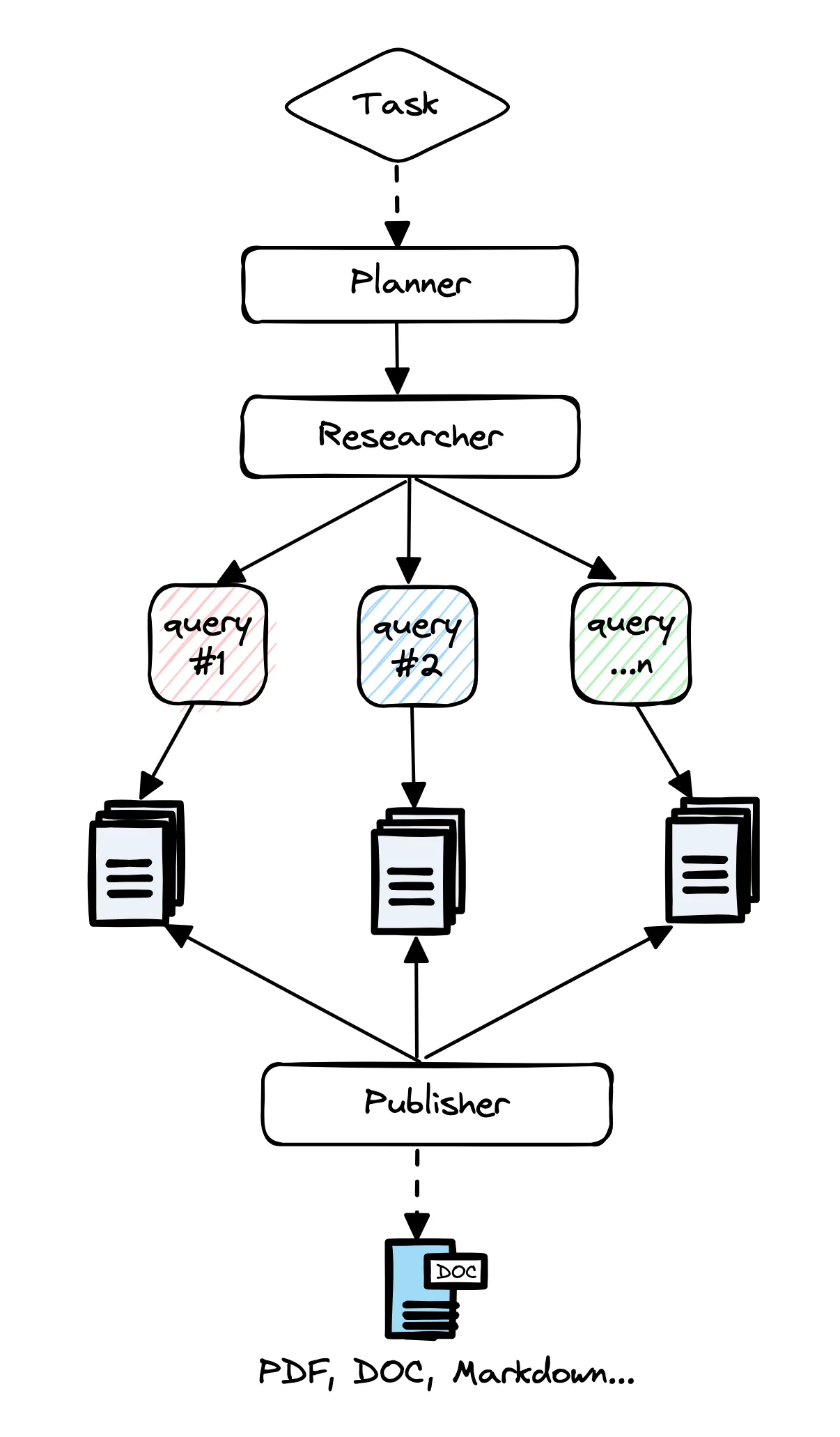
What: A pip library and API for report generation, with multi-agent workflows and recursive research in breadth and depth.
Why: With 30,000+ GitHub stars, it is the common base when research is a feature of your product. It also installs as a Claude skill.
Use when: You are wiring research reports into an app.
Install:
pip install gpt-researcherCatch: You supply the LLM and search keys (the quickstart uses OpenAI and Tavily) and write the wiring yourself.
6. Morphic: the answer engine you fork #
Morphic is an AI search engine with a generative UI: a Next.js codebase you clone, configure and make your own.
What: A full-stack starter: streaming answers, search-provider integrations and a generative UI you can reshape.
Why: When the off-the-shelf engines stop fitting, you own the whole stack.
Use when: You are building your own product and want a proven base to fork.
Install:
git clone https://github.com/miurla/morphic.git && cd morphic && cp .env.local.example .env.local
# add an AI provider key to .env.local, then:
docker compose up -d
Catch: You need at least one AI provider key, and the stack runs PostgreSQL, Redis and SearXNG alongside the app.
Which one to try first #
Want the product, not a project → #1. Live in Claude Code → #2. Your own documents are the corpus → #3. Privacy over everything → #4. Research as an app feature → #5. Fork and build → #6.
FAQ
- What is a deep research agent?
- Software that takes one question, plans sub-questions, searches the web or your documents in multiple steps, reads the sources, and returns a long report with citations — unlike a single-shot chat answer.
- Can deep research run fully locally?
- Yes. Local Deep Research pairs your own Ollama models with a SearxNG search instance and stores everything in an encrypted database, and Vane supports local LLMs through Ollama — no cloud provider required for either.
- What happened to Perplexica?
- It was renamed Vane. The old GitHub URL redirects to the Vane repo, and it is still a self-hosted answer engine with cited sources.