
7 open-source tools to self-host your smart home
Seven verified tools to self-host your smart home — the hub, local voice, AI cameras and radio bridges, all on your own hardware.
7 tools · Last checked
Cloud subscriptions decide what your lights do, your cameras upload strangers' homes, and your voice dies when the internet does. The open-source stack runs all of it on hardware you own, including local object detection and local voice.
Every pick pushed a commit in the last 90 days and installs from its own docs. Ordered as you would build: hub, flows, radios, cameras, DIY firmware, voice.
The 7 tools at a glance #
| Tool | What it does | Price | Install |
|---|---|---|---|
| Home Assistant | The hub: local control, privacy first | Free · OSS (Apache-2.0) | docker run -d … home-assistant:stable |
| Node-RED | Low-code flows between everything | Free · OSS (Apache-2.0) | sudo npm install -g --unsafe-perm node-red |
| Zigbee2MQTT | Zigbee devices without vendor bridges | Free · OSS (GPL-3.0) | docker pull ghcr.io/koenkk/zigbee2mqtt |
| Frigate | AI object detection for IP cameras | Free · OSS (MIT) | docker pull ghcr.io/blakeblackshear/frigate:stable |
| ESPHome | YAML firmware for ESP32/RP2040 chips | Free · OSS (MIT + GPL) | pip install esphome |
| Wyoming | TCP protocol wiring local voice parts | Free · OSS (MIT) | pip install wyoming |
| openHAB | Vendor-neutral alternative hub | Free · OSS (EPL-2.0) | docker run -it openhab/openhab:… |
1. Home Assistant: the hub everything joins #
Home Assistant is open-source home automation that puts local control and privacy first, built to run on a Raspberry Pi or a local server.
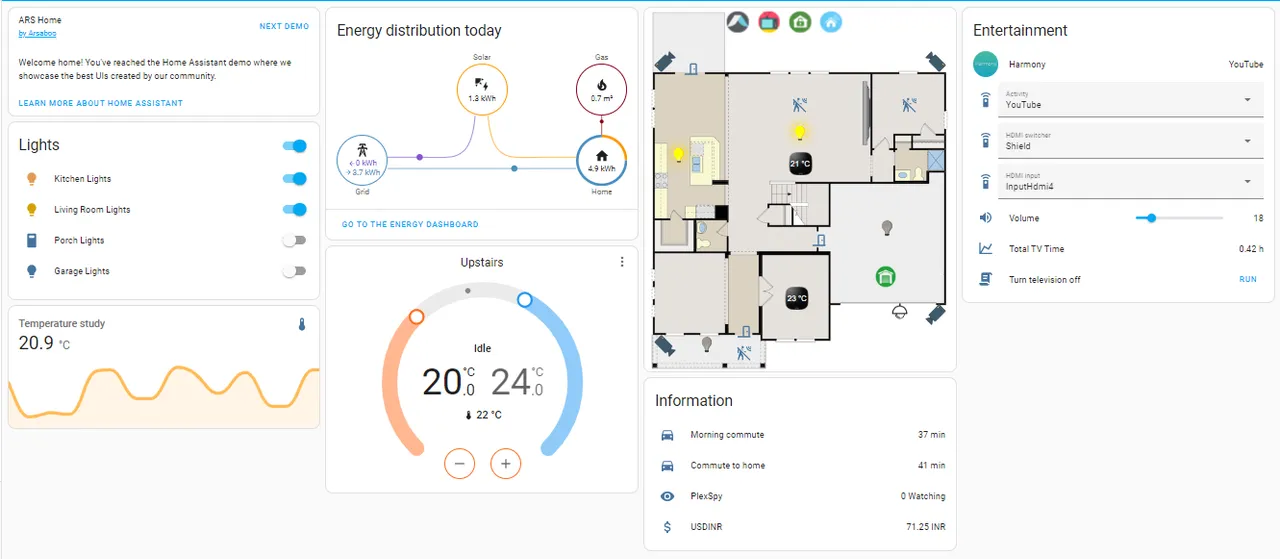
What: One hub for thousands of integrations, dashboards and automations, plus conversation agents that can take orders from a local LLM.
Why: It is the de-facto center of the self-hosted stack; everything below plugs into it.
Use when: You are starting a private smart home. This is the first install.
Install:
docker run -d --name home-assistant --privileged --restart=unless-stopped -v /PATH_TO_YOUR_CONFIG:/config --network host ghcr.io/home-assistant/home-assistant:stableCatch: Home Assistant OS is the recommended install for most users. The plain Docker container has no Supervisor, so no one-click apps or managed updates.
2. Node-RED: wire the logic in flows #
Node-RED is low-code programming for event-driven applications: a browser editor where you wire nodes into flows.
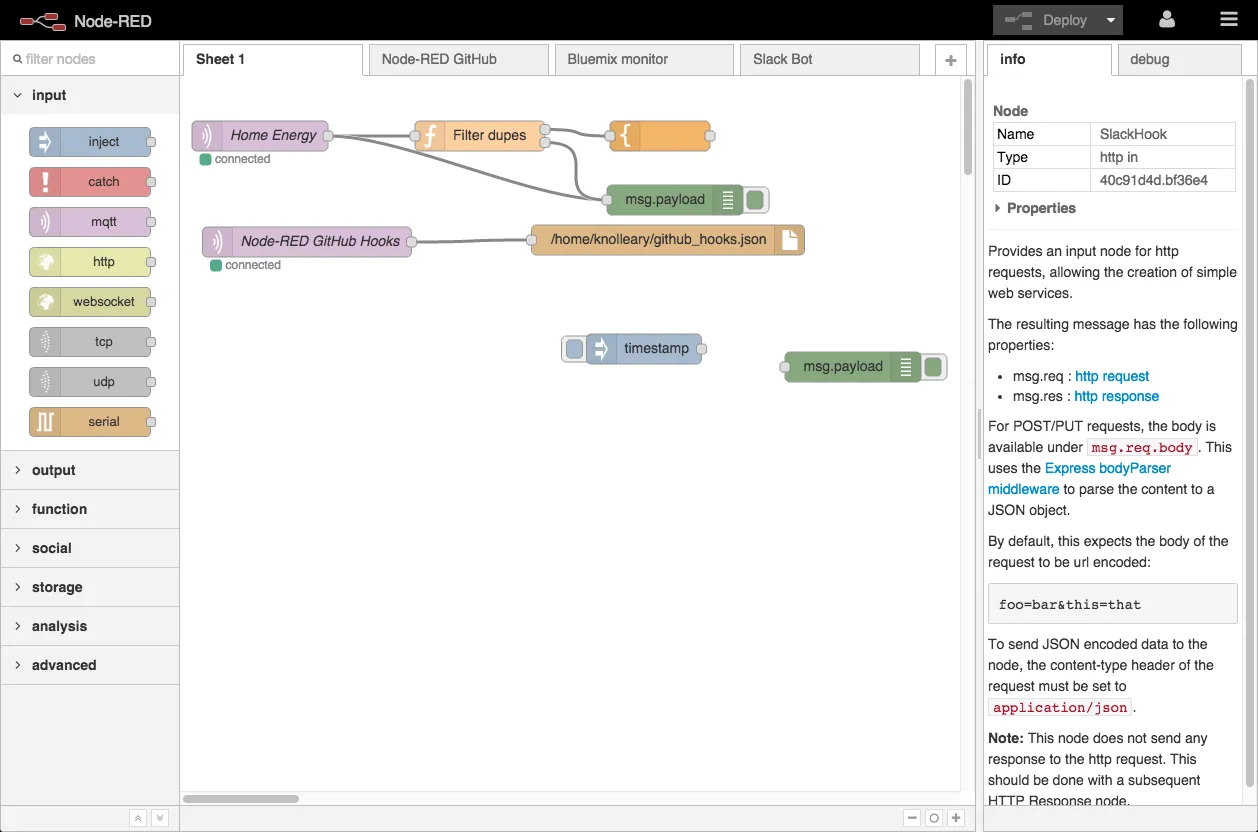
What: Drag-and-drop nodes for MQTT, HTTP, timers and functions, wired visually into automations.
Why: Complex logic stays readable. A non-programmer can trace why the porch light turned on.
Use when: HA's native automations get too long and you want visual wiring.
Install:
sudo npm install -g --unsafe-perm node-redCatch: The editor is not secured by default. Anyone who can reach it can change your flows, so set adminAuth before exposing it.
3. Zigbee2MQTT: your devices, off their bridges #
Zigbee2MQTT lets you use your Zigbee devices without the vendor's bridge or gateway. It publishes them over MQTT (a lightweight message bus) to whatever hub you run.
What: One USB coordinator dongle talks to devices from Xiaomi, IKEA, Philips, OSRAM and more.
Why: Vendor clouds die; a Zigbee mesh on your own radio does not.
Use when: Your bulbs and sensors demand proprietary hubs and you would rather not.
Install:
docker pull ghcr.io/koenkk/zigbee2mqttCatch: You need a supported Zigbee coordinator dongle, and the container runs via the Docker Compose file from its docs.
4. Frigate: cameras that detect, not upload #
Frigate is a complete NVR (network video recorder) with real-time object detection for IP cameras, run on your own hardware.
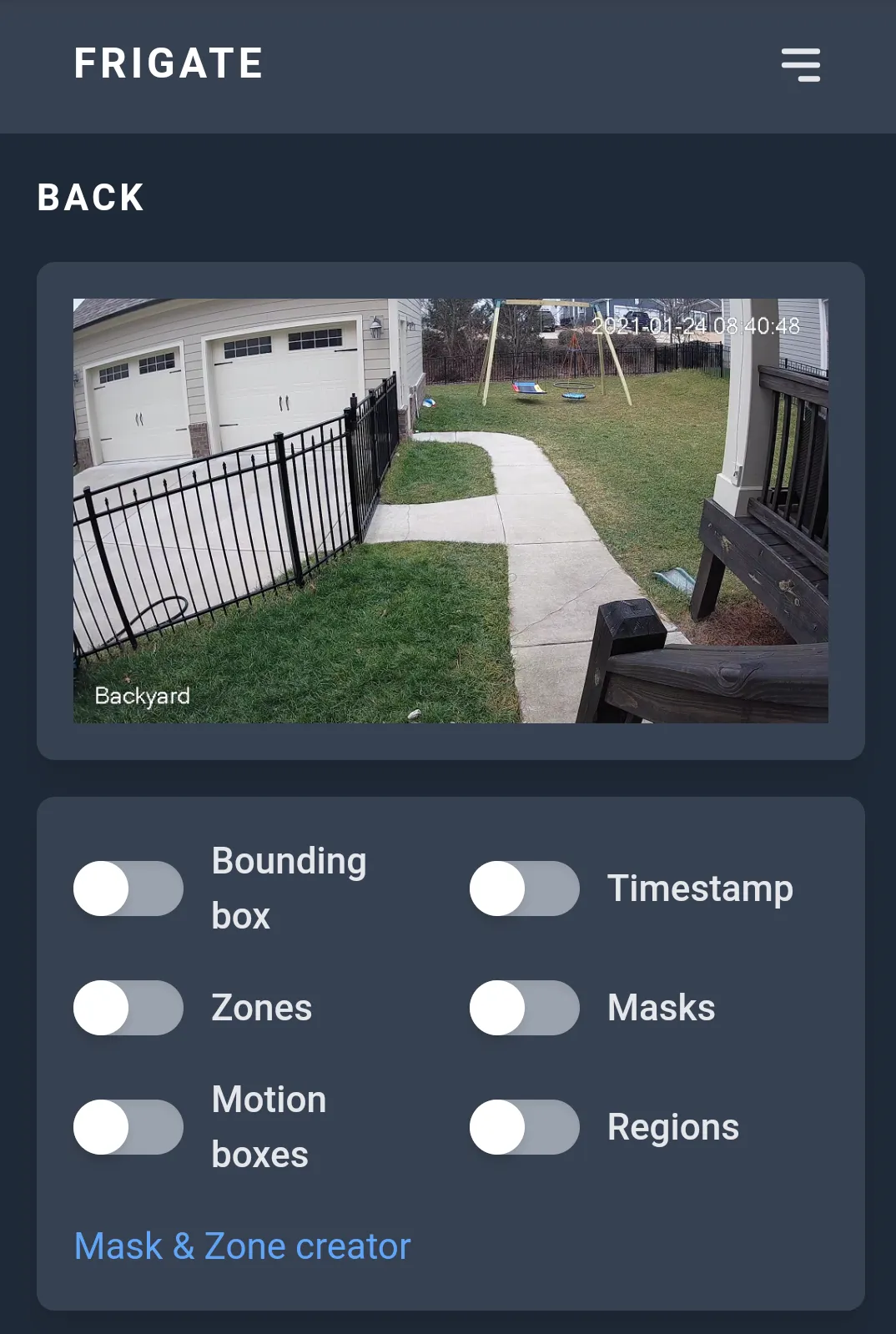
What: Records every camera, detects people, cars and pets in real time, and alerts on zones you draw.
Why: The footage and the AI never leave your network. No subscription, no uploaded neighbors.
Use when: You want security cameras that are smart without being cloud-tethered.
Install:
docker pull ghcr.io/blakeblackshear/frigate:stableCatch: Its docs mark the CPU detector "not recommended". Plan for an accelerator such as a Coral, Hailo or MemryX chip, or a supported GPU.
5. ESPHome: firmware for DIY sensors and speakers #
ESPHome turns ESP32, ESP8266 and RP2040 microcontrollers into smart home devices, configured in YAML.
What: Describe the sensors, buttons and lights on a $5 board in YAML; ESPHome builds and flashes the firmware.
Why: A custom presence sensor or voice satellite becomes an afternoon project, not an engineering degree.
Use when: A sensor you want does not exist, or costs forty dollars when the chip costs five.
Install:
pip install esphomeCatch: The first install has to happen over a USB cable. Only later updates go over Wi-Fi.
6. Wyoming: the local voice protocol #
Wyoming is a peer-to-peer network protocol for voice assistants: JSON messages plus raw audio.
What: The wiring standard that connects wake-word detection, speech-to-text, intent handling and text-to-speech as separate services.
Why: It is how Home Assistant's Assist voice assistant runs entirely on your hardware, with no cloud hop.
Use when: You want "hey assistant" to work with the internet off.
Install:
pip install wyomingCatch: Wyoming is plumbing, not a product. You assemble the wake-word, speech-to-text and text-to-speech services around it.
7. openHAB: the vendor-neutral alternative hub #
openHAB is vendor-neutral home automation software. Add-ons called bindings bridge each device protocol onto one event bus.
What: A Java-based hub with its own rules engine and UIs.
Why: If Home Assistant's model frustrates you, openHAB is the mature alternative with a different philosophy.
Use when: You prefer formal, binding-based integration over HA's approach.
Install:
docker run -it openhab/openhab:<version>-<distribution> ./start_debug.shCatch: A far smaller community: around 1,000 GitHub stars against Home Assistant's 92,000, so expect fewer ready-made integrations.
Which one to try first #
Starting from zero → #1 and add the rest to it. Cameras going to a cloud → #4. Devices stuck behind vendor bridges → #3. Logic HA can't express → #2. A missing sensor → #5. Voice without cloud → #6. HA alternative → #7.
FAQ
- Can a smart home really run without the cloud?
- Yes. Home Assistant controls devices locally, Zigbee2MQTT removes vendor bridges by talking to devices over MQTT, Frigate runs object detection on your own hardware, and the Wyoming protocol keeps wake-word, speech and voice playback entirely on your network.
- Home Assistant or openHAB?
- Home Assistant has the far larger community and integration catalog — 92,000 GitHub stars against openHAB's roughly 1,000 — and is the usual first install. openHAB is the mature, vendor-neutral, JVM-based alternative if you prefer binding-based integrations.
- What hardware do I need to start?
- A Raspberry Pi or any local server for Home Assistant, a supported Zigbee USB coordinator dongle for Zigbee2MQTT, IP cameras for Frigate, and ESP32 boards only if you build your own sensors. Voice can start with a mic on the same server.
Sources
- github.com/home-assistant/core
- home-assistant.io/installation/generic-x86-64/
- github.com/node-red/node-red
- nodered.org/docs/user-guide/runtime/securing-node-red
- github.com/Koenkk/zigbee2mqtt
- zigbee2mqtt.io/guide/installation/02_docker.html
- github.com/blakeblackshear/frigate
- docs.frigate.video/frigate/installation/
- github.com/esphome/esphome
- esphome.io/install/
- github.com/OHF-Voice/wyoming
- github.com/openhab/openhab-distro