
7 tools that turn text into diagrams
Write diagrams as text and render them as SVG: 7 open-source tools, from Mermaid and D2 to Kroki, one API for 20+ diagram languages.
7 tools · Last checked
Diagrams go stale because editing them means dragging boxes. Write them as text next to the code they document (Claude can draft it), and these seven tools turn the text into pictures.
Every pick pushed a commit in the last 90 days (checked 2026-11-20) and has an install path from its own docs.
The 7 tools at a glance #
| Tool | What it does | Price | Install |
|---|---|---|---|
| Mermaid | Markdown-style markup, renders in GitHub | Free · OSS (MIT) | npm install mermaid |
| D2 | Modern diagram-as-code with a CLI | Free · OSS (MPL-2.0) | curl -fsSL https://d2lang.com/install.sh | sh -s -- |
| PlantUML | The UML veteran, 20+ diagram types | Free · OSS (LGPL-3.0) | brew install plantuml |
| Diagrams | Python code → cloud architecture icons | Free · OSS (MIT) | pip install diagrams |
| Excalidraw | Hand-drawn whiteboard, imports Mermaid | Free · OSS (MIT) | npm install @excalidraw/excalidraw |
| drawDB | Visual database schemas, exports SQL | Free · OSS (AGPL-3.0) | Clone, then docker build -t drawdb . |
| Kroki | One API renders 20+ languages | Free · OSS (MIT) | docker run -d -p 8000:8000 yuzutech/kroki |
1. Mermaid: the markup GitHub already renders #
Mermaid is a JavaScript tool that draws diagrams and charts from Markdown-like text.
What: Flowcharts, sequence, Gantt, state, ER and mindmap diagrams from text that lives in your README.
Why: GitHub and GitLab render Mermaid code blocks natively: paste markup, get a picture, no tooling.
Use when: Diagrams belong in docs, PRs and chat replies.
Install:
npm install mermaidCatch: Layout is automatic with little control, so large diagrams get messy.
2. D2: the modern engine with better layouts #
D2 is a diagram language with a CLI: write text, run one command, get an SVG. It bundles three layout engines you can switch between.
What: d2 --watch in.d2 out.svg re-renders on every save; themes, icons and container nesting built in.
Why: More control over layout and styling than Mermaid, for output you can put in a slide.
Use when: The diagram itself is the deliverable.
Install:
curl -fsSL https://d2lang.com/install.sh | sh -s --Catch: Nothing renders D2 natively in GitHub or chat apps — you ship SVG files instead.
3. PlantUML: the UML veteran, now with an MCP server #
PlantUML draws UML (standard software design notation) diagrams from text. Its new @plantuml/mcp-js server lets your AI assistant render and check PlantUML through MCP (Model Context Protocol), with no Java.
What: Sequence, class, component, deployment and 20+ other diagram types from text.
Why: It covers formal UML types the lighter languages skip.
Use when: You need formal UML — class diagrams, sequence flows — beyond boxes and arrows.
Install:
brew install plantumlCatch: The classic engine needs Java; only the MCP server and a browser JavaScript build run without it.
4. Diagrams: cloud architecture as Python code #
Diagrams is Diagram as Code: Python scripts that place real AWS, GCP, Azure, Kubernetes and on-prem icons into architecture diagrams.
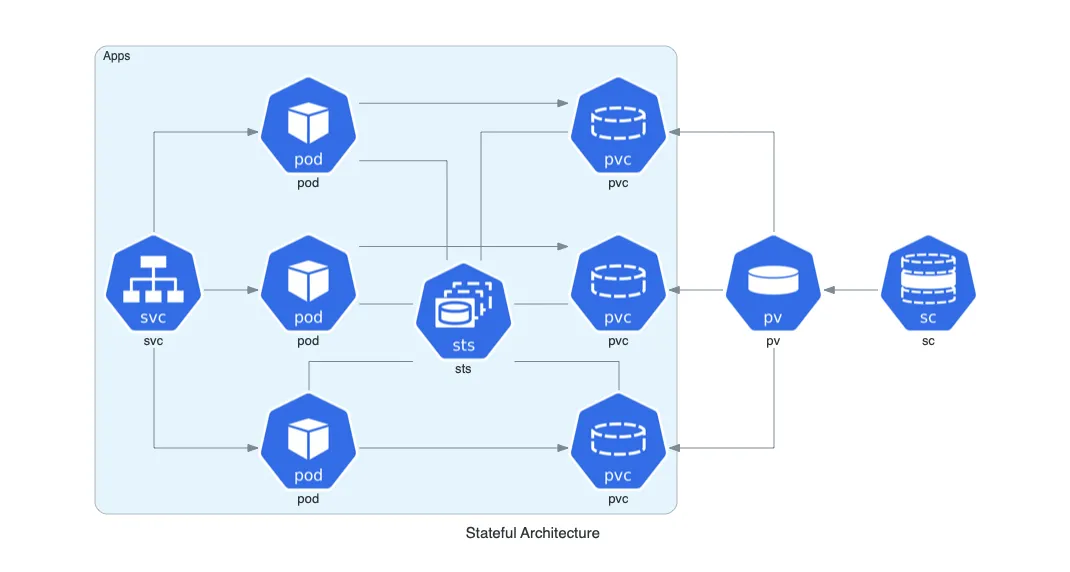
What: Python nodes and edges render through Graphviz, a graph layout tool, into architecture diagrams with real provider icons.
Why: Infra diagrams become reviewable code — diff them in PRs like everything else.
Use when: You document cloud systems and want versioned, reproducible pictures.
Install:
pip install diagramsCatch: You must install Graphviz separately (brew install graphviz on macOS), and it suits architecture diagrams only.
5. Excalidraw: hand-drawn looks, visual edits #
Excalidraw is an open-source whiteboard with a hand-drawn style, for diagrams and wireframes you keep editing visually.
What: An infinite canvas with libraries, plus a Mermaid-to-Excalidraw converter so generated text becomes editable shapes.
Why: Generate a first draft from text, then fix the layout by dragging.
Use when: People will keep editing the picture by hand.
Install:
npm install react react-dom @excalidraw/excalidrawCatch: There is no CLI: you draw at excalidraw.com, and the npm package embeds the editor in your own React app.
6. drawDB: database schemas you can edit by hand #
drawDB is a browser editor for database diagrams (ERDs): draw tables and relationships, then import or export SQL, with no account.
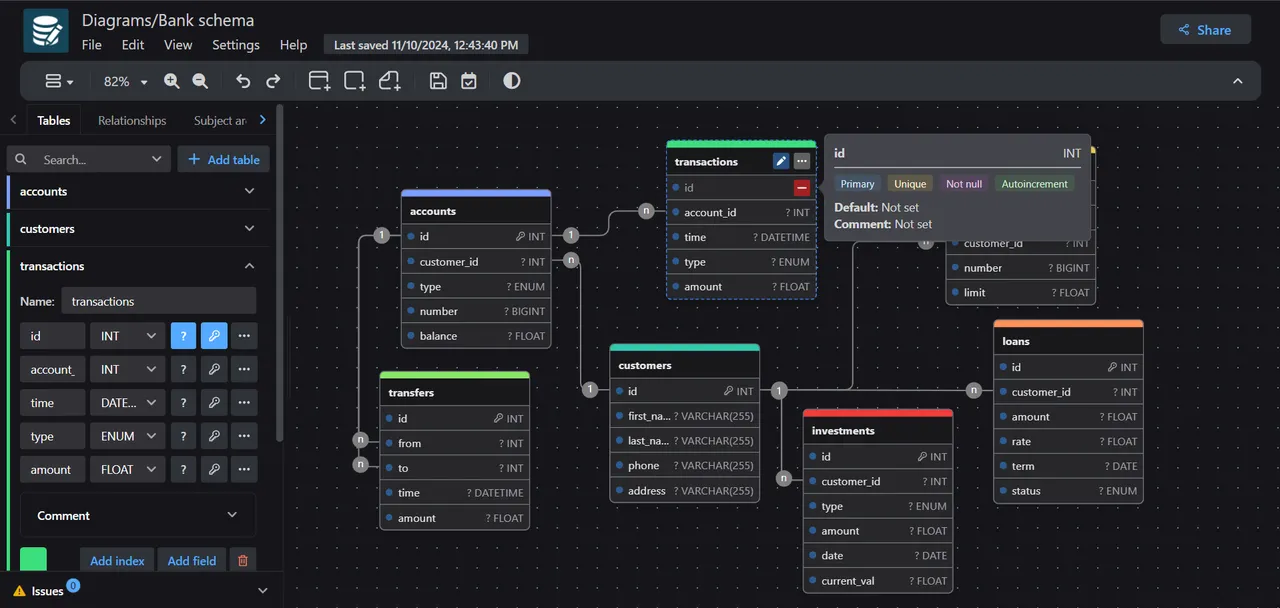
What: A browser editor for ER diagrams with type pickers, indexes and SQL export per dialect.
Why: It turns SQL into a diagram and back, free and self-hostable.
Use when: You are designing or explaining a database schema.
Install:
git clone https://github.com/drawdb-io/drawdb
cd drawdb
docker build -t drawdb .
docker run -p 3000:80 drawdb
Catch: AGPL-3.0, and file sharing needs a separate companion server.
7. Kroki: one API renders them all #
Kroki is one API for 20+ diagram languages, including Mermaid, PlantUML, D2, Excalidraw, GraphViz, Vega and DBML.
What: A self-hostable service: POST diagram text, get SVG or PNG back.
Why: Your docs pipeline renders every format with one dependency instead of seven.
Use when: You run a docs site or CI that must render whatever markup lands in it.
Install:
docker run -d -p 8000:8000 yuzutech/krokiCatch: Mermaid, BPMN, Excalidraw and diagrams.net (experimental) need separate companion containers. The single docker run covers the rest.
Which one to try first #
Diagrams in docs and PRs → #1. Slide-ready output → #2. Formal UML → #3. Cloud architecture → #4. Hand-edited pictures → #5. Database schemas → #6. One renderer for everything → #7.
FAQ
- Which diagram language should Claude generate?
- Mermaid when the diagram lives in docs, PRs or chat — GitHub and GitLab render it natively. D2 when you want a cleaner standalone SVG, PlantUML when you need formal UML types like sequence and class diagrams.
- Can I render all these languages through one endpoint?
- Yes — Kroki provides a unified API covering Mermaid, PlantUML, D2, Excalidraw, GraphViz, Vega, DBML and more. Run it with one docker command and POST diagram text to get SVG or PNG back.
- Is Excalidraw diagram-as-code?
- No — it is a visual whiteboard. The bridge is its Mermaid-to-Excalidraw converter: text generates the first draft, then you edit shapes by hand while keeping the hand-drawn look.